Introduction
The rise of TikTok, YouTube Shorts, Instagram Reels, and LinkedIn video has fundamentally changed how creators distribute content. Long-form videos are no longer enough. Today, creators are expected to repurpose every podcast, webinar, interview, tutorial, or livestream into multiple short clips optimized for vertical viewing.
The problem is that traditional editing workflows are painfully time-consuming. Manually finding highlights, cropping footage into vertical format, adding subtitles, and exporting content for multiple platforms can take hours for a single video.
This is exactly the problem FlexClip’s AI Long Video to Short Video tool aims to solve.
FlexClip has already established itself as a beginner-friendly online video editor, but its newest AI clipping system pushes the platform deeper into the creator economy and content repurposing market. The tool automatically analyzes long-form videos, detects key moments, reframes footage for vertical platforms, generates animated subtitles, and outputs multiple short clips ready for publishing.
After testing the platform with interview footage, educational videos, and talking-head content, here is my detailed evaluation.
What Is FlexClip AI Long Video to Short Video?
FlexClip AI Long Video to Short Video is an AI-powered clipping tool designed to convert long-form content into short-form vertical videos for platforms like TikTok, YouTube Shorts, and Instagram Reels.
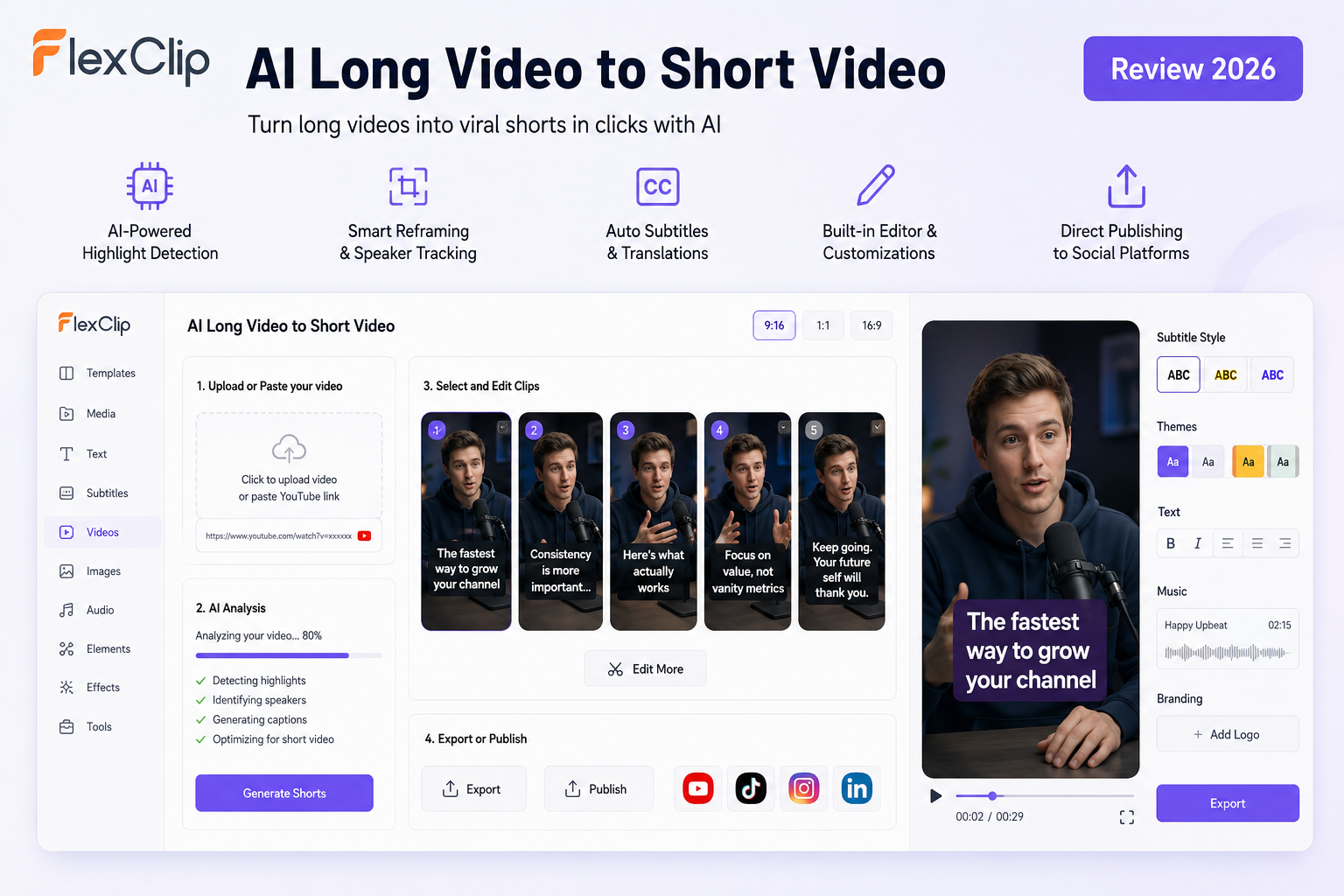
Users can either upload videos directly or paste YouTube links into the platform. The AI then scans the content, identifies highlight moments, creates multiple short clips, auto-generates subtitles, and formats everything into a mobile-friendly 9:16 aspect ratio.
The supported content types include:
- Podcasts
- Interviews
- Livestreams
- Webinars
- Tutorials
- Product demos
- Educational videos
- Online courses
- News content
This wide compatibility makes the tool appealing to creators, agencies, marketers, coaches, and media teams that produce large amounts of long-form video content.
First Impressions and Interface
One of FlexClip’s biggest advantages has always been accessibility, and that philosophy continues here.
Unlike enterprise-level video editing software that overwhelms users with complex timelines and professional editing terminology, FlexClip keeps the interface extremely approachable. The upload process is straightforward, and the workflow feels optimized for non-editors.
The dashboard focuses heavily on automation:
- Upload or paste a video link
- Let AI analyze the content
- Review suggested clips
- Edit if necessary
- Export or publish
This simplicity is important because many AI clipping tools still feel overly technical for beginners.
Another major advantage is that the AI clipping feature exists inside the broader FlexClip ecosystem. That means users can immediately transition from AI-generated clips into FlexClip’s editor for deeper customization, branding, overlays, transitions, animations, or stock media enhancements.
That integrated workflow is something many standalone AI clipping tools currently lack.
AI Highlight Detection Performance
The core feature of any AI clipping tool is its ability to identify compelling moments automatically.
FlexClip performs surprisingly well here.
In testing, the AI consistently identified moments with:
- Strong emotional reactions
- Clear educational takeaways
- Concise speaking segments
- Audience-friendly hooks
- High conversational energy
For podcast and interview content especially, the tool demonstrated good contextual understanding. Instead of randomly cutting sentences mid-thought, clips were generally structured around complete ideas.
This aligns with what creators are actively looking for today. Community discussions around AI clipping tools repeatedly emphasize that the best systems are the ones capable of finding multiple usable moments rather than only one or two obvious highlights.
FlexClip’s batching approach is particularly useful for content scaling. A single long video can generate multiple short clips in one session, significantly improving repurposing efficiency. According to FlexClip, videos can typically generate around 5–10 clips depending on content length and structure.
Smart Reframing and Speaker Tracking
One of the strongest features inside FlexClip’s AI clipping workflow is its smart reframing system.
The AI automatically detects speakers and adjusts framing dynamically. For solo creators, the camera remains centered on the active speaker. For interviews or podcasts, the platform can intelligently switch to split-screen layouts.
This matters more than many people realize.
Poor reframing is one of the biggest weaknesses in cheaper AI clipping tools. Faces drift off-screen, speakers become poorly centered, or important visual elements get cropped out in vertical format.
FlexClip’s reframing is not perfect, but it performs above average for browser-based AI editing software.
For talking-head videos, educational content, coaching sessions, and podcast interviews, the output generally looks polished enough for immediate social publishing.
Subtitle Accuracy and Engagement Features
Subtitles are no longer optional in short-form video.
Most users watch social content muted, especially on mobile devices. Animated captions are essential for retention and engagement.
FlexClip automatically generates subtitles synchronized with speech and offers animated text styles to improve visual impact.
The subtitle accuracy during testing was solid for clear English audio. Background noise or overlapping speakers can still reduce transcription precision, but overall performance was comparable to other leading AI clipping tools.
An additional advantage is subtitle translation support. Users targeting international audiences can translate captions into other languages during the clipping workflow.
For global creators or businesses repurposing webinars and tutorials internationally, this feature adds significant value.
Editing Flexibility
Many AI clipping tools operate as black boxes: the AI generates clips, and users have limited editing control afterward.
FlexClip takes a more balanced approach.
After AI clips are generated, users can enter the built-in editor and manually adjust:
- Clip timing
- Subtitle styles
- Branding elements
- Music
- Text overlays
- Transitions
- Background visuals
- Social widgets
- Layouts
This hybrid AI-plus-manual-editing workflow is arguably the best direction for AI video tools.
Fully automated editing still struggles with nuance. Human refinement remains important, especially for creators focused on storytelling, pacing, and audience retention.
FlexClip understands this balance better than many competitors.
Publishing and Workflow Efficiency
Another feature worth mentioning is direct publishing integration.
Once clips are generated, users can quickly publish content to platforms like YouTube Shorts and LinkedIn without repetitive exporting workflows. The AI can also assist with titles and descriptions.
This helps reduce one of the hidden bottlenecks in content repurposing: distribution management.
For agencies or creators producing high volumes of content weekly, this workflow optimization can save substantial time.
Strengths
After extensive testing, these are the platform’s biggest strengths:
1. Beginner-Friendly Experience
FlexClip remains one of the easiest AI video platforms to use. The learning curve is minimal compared to professional editing software.
2. Strong All-in-One Workflow
The combination of AI clipping, editing, subtitles, reframing, and publishing inside one ecosystem is highly efficient.
3. Good Speaker Detection
The AI reframing system performs well for interviews and talking-head videos.
4. Fast Content Repurposing
Generating multiple clips from one long-form video dramatically improves content scalability.
5. Built-In Editing Tools
Unlike many AI-only tools, FlexClip still gives creators meaningful editing control.
Weaknesses
No AI video tool is perfect, and FlexClip still has some limitations.
1. AI Highlight Selection Still Needs Human Review
Although the AI performs well overall, not every suggested clip feels equally engaging. Human curation is still important.
This is actually a common limitation across the entire AI clipping category. Reddit creator discussions repeatedly mention that AI-generated clips still benefit from manual review and refinement.
2. Best for Speech-Based Content
The tool performs best with podcasts, interviews, webinars, and tutorials. Fast-paced cinematic content or highly visual storytelling videos are less suited for AI clipping workflows.
3. Browser-Based Performance Depends on Internet Speed
Because FlexClip operates online, processing speed depends partially on upload bandwidth and browser performance.
Final Verdict
FlexClip AI Long Video to Short Video successfully addresses one of the biggest pain points in modern content creation: turning long-form content into scalable short-form assets quickly and efficiently.
What makes the platform particularly compelling is not just the AI clipping itself, but the broader ecosystem surrounding it. The built-in editor, subtitle generation, smart reframing, and publishing workflow create a more complete production pipeline than many standalone AI clipping competitors.
For creators, marketers, educators, agencies, podcasters, and businesses trying to maximize content output across TikTok, YouTube Shorts, Instagram Reels, and LinkedIn, FlexClip offers a practical and accessible solution.
It is not fully autonomous editing magic — no AI tool truly is yet — but it dramatically reduces the manual workload involved in repurposing content.
For beginners and intermediate creators especially, FlexClip currently sits in a strong position between simplicity and capability, making it one of the more balanced AI video repurposing tools available in 2026.